Just shipped
What’s new in Trainzo.
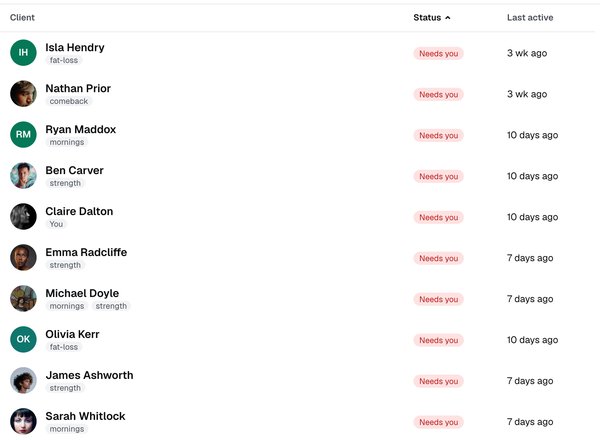
- 23 OctSee who’s gone quietYour Clients page shows when each client was last active in the app, not only when they last trained.
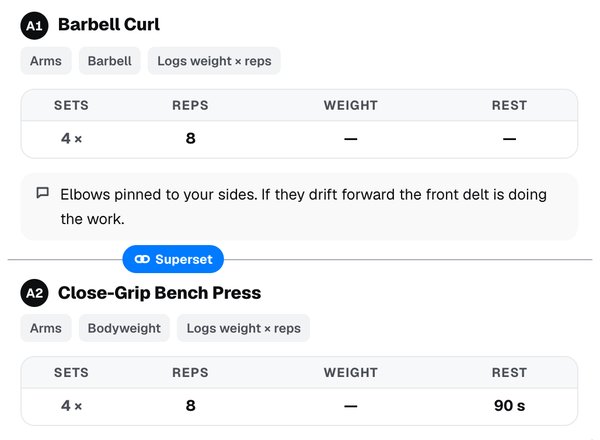
- 23 OctSupersetsLink two exercises in the workout editor, and your client’s app runs them back to back.
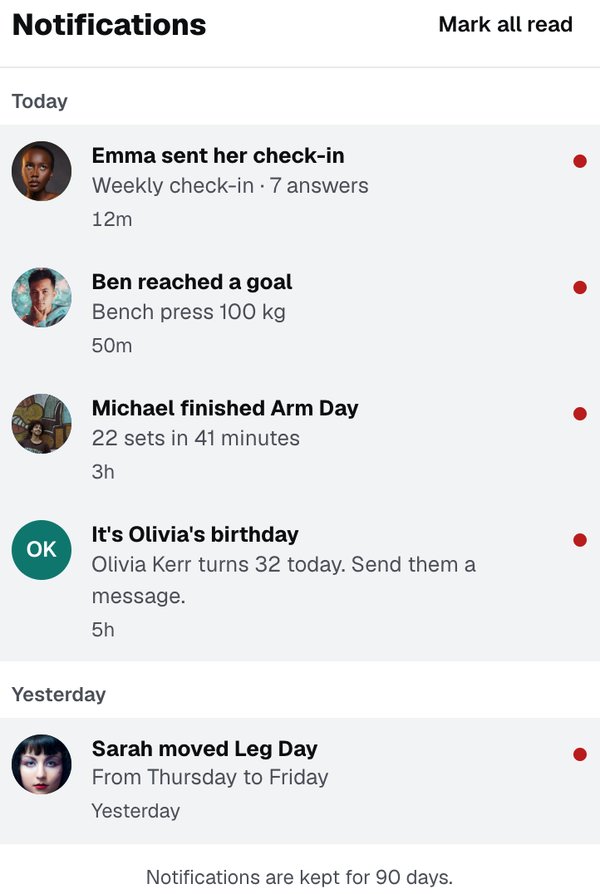
- 23 OctA bell for what mattersCheck-ins sent, goals reached, sessions moved and more, collected under one bell on the web and in the app.
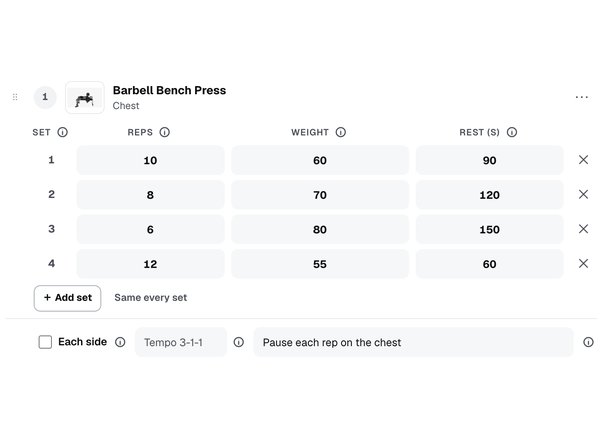
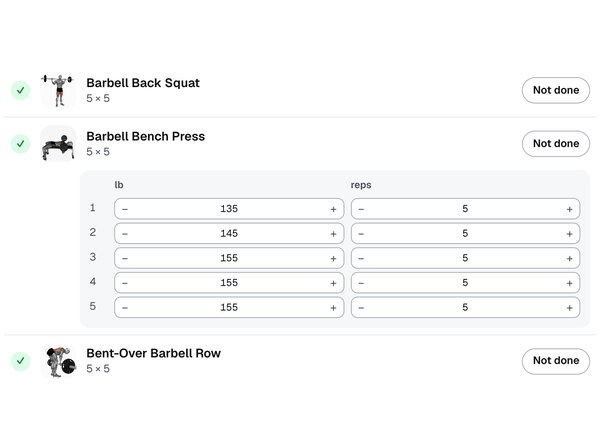
- 23 OctVary setsGive each set its own reps, weight and rest, for pyramids, drop sets and top sets.
- 22 OctKilos or pounds, per exerciseChoose kg or lb for each exercise, so a client can lift dumbbells in kilos and push the sled in pounds.
- 9 OctApple Health and Health ConnectClients connect Apple Health or Health Connect, and the numbers they choose to share arrive by themselves.
- 9 OctThe client chooses what each coach seesHealth data is shared coach by coach and metric by metric, only when the client says yes.
- 9 OctActivity trends on the client’s profileSteps, sleep and more as trends beside the training, on each client’s profile.
At a glance
10 phases. We are on phase 7.
How we work
Shipped often. Never rushed.
There are no release dates. Every feature goes through the same three steps and ships the day every check passes — then the next one starts.
- 01
Pick
The most-needed thing in the queue, decided by what coaches ask for.
- 02
Build it with its tests
Every feature is written with checks for what must work, what must be refused, and the awkward cases — empty, too long, someone else’s.
- 03
Ship only when everything passes
More than 9,000 automated checks run before anything goes live. One failure, and it does not ship.
Your clients are sealed off
The database itself checks every request: one coach can never see another coach’s clients or programmes. Tested on every release.
Private files stay private
Client photos, videos and voice notes open only through short-lived links, for the two people in that conversation.
Tried on real phones
Every app release runs on real iPhones and Android phones before it reaches the stores.
The timeline
From day one to the furthest plan.
- Done30 Jul – 6 Aug
1. The coach’s workshop
Everything a coach needs to build training and deliver it: clients, a library, builders, a calendar and a way to talk.
- Coach dashboard: clients, invites, workout builder, assigning30 Jul
- Programmes with phases, enrolment, pause and resume31 Jul
- 44 ready-made workouts to copy and edit31 Jul
- Repeating assignments31 Jul
- Coach yourself — one account for both hats1 Aug
- Spreadsheet-fast programme builder2 Aug
- Messaging with read receipts4 Aug
- Upload your own demo videos4 Aug
- Coach calendar with drag to reschedule6 Aug
- Archive a client, keep their history6 Aug
- Done7 Aug – 24 Sep
2. The client’s app
The other half of coaching: the client opens their phone, sees today, follows the video and logs every set — and the coach sees it.
- Client app for iPhone and Android: today, the player, set logging7 Aug
- Progress for the client: lifts, weigh-ins, history11 Aug
- A library of 2,000+ exercises with instructions14 Aug
- Demo videos for 98% of the library15 Aug
- 25 ready-made programmes, coaching notes included17 Aug
- A dashboard that answers “who needs me today?”29 Aug
- Last time’s numbers already filled in3 Sep
- Push notifications7 Sep
- Planks, runs and carries logged in what they measure8 Sep
- Tailor one client’s session without touching the workout10 Sep
- Replies and reactions in messages10 Sep
- Sign in with Apple17 Sep
- Report and block21 Sep
- In the App Store and Google Play24 Sep
- Done1 Oct – 7 Oct
3. Daily coaching
Coaching happens between sessions too: tasks, habits, goals and real conversation — photos, video and voice.
- Invite links that open the app1 Oct
- Dark mode1 Oct
- Tasks with reminders and history5 Oct
- Clients can train on the web too5 Oct
- Give anything from one screen, in two taps6 Oct
- Habits with streaks6 Oct
- Goals that move themselves from what is logged7 Oct
- Photos, video, files and voice notes in messages7 Oct
- Progress photos, compared side by side7 Oct
- Done7 Oct – 8 Oct
4. Accountability
Know how every client is doing without having to ask — and answer them faster when they tell you.
- Saved — keep any message or note7 Oct
- Saved replies: type / in any conversation8 Oct
- Scheduled messages8 Oct
- Weekly check-ins with review, reply and trends8 Oct
- Onboarding questionnaires for new clients8 Oct
- Done9 Oct
5. Health data
See what happens outside the gym — sleep, steps, heart rate — beside the training, shared only with the client’s consent.
- Apple Health and Health Connect sync9 Oct
- The client chooses what each coach sees9 Oct
- Activity trends on the client’s profile9 Oct
- Step and sleep targets9 Oct
- Done9 Oct
6. More clients, less typing
Say it once and it reaches everyone who needs it — the welcome, the check-in, the reminder — so a bigger roster takes no more of your day.
- Broadcast a message to many clients, or to a tag9 Oct
- Automations: day-one welcome, day-three check-in9 Oct
- Give a programme to a whole group in one step9 Oct
- TodayBuilding now0 of 4 done
7. Nutrition
Training and eating, coached in one place — included in every plan, not sold as an add-on.
- Macro targets, phased for a cut or maintenanceBuilding
- Food logging with barcode scanning
- Meal plans and recipe books
- Grocery lists from a meal plan
- Later3 planned
8. Coaching at scale
For coaches with dozens of clients: set it up once, and it happens for every one of them.
- An on-demand library clients browse themselves
- Group chat and challenges
- Teams that coach together
- Later3 planned
9. The business side
Run the coaching business, not just the coaching.
- Sell packages and monthly coaching
- Booking: 1-on-1 and class slots
- Coach analytics: retention and adherence
- Later4 planned
10. Your platform
Trainzo carrying your brand, connected to the tools you already use.
- Your colours and logo in the client app
- Direct Garmin, Oura, WHOOP and Fitbit connections
- An API and Zapier
- AI that drafts for the coach — never a plan sent without you
What we will not build
- AI-written programmes sent to your clients without you.
- Charging your clients for the app they train in.
- Showing your programming to another coach, or selling anyone’s data.
- Holding your history hostage if you leave.
Missing something?
Tell us what you need. It moves the queue.
Every message is read by the person who builds it.